
🚨 Struggling to coordinate cross-functional teams?
In today’s fast-paced business environment, gaps in communication, conflicting priorities, and unclear responsibilities among diverse teams can lead to significant productivity losses, up to 30% annually, according to recent studies. These issues affect on-time delivery, project quality, and the achievement of strategic goals.
The solution lies in specialized digital project management tools, which provide a unified central platform that consolidates tasks from different departments, prioritizes them accurately, and facilitates collaboration among development, marketing, sales, and management teams. With workflow automation, task tracking, and real-time alerts, teams can continuously monitor progress, reduce unnecessary meetings, and ensure high-efficiency project execution.
This article explores the concept of cross-functional teams, the challenges they face, and how project management tools enhance coordination and productivity, including practical examples and modern techniques for task and communication management across departments.
💡 Continue reading to discover how to make your cross-functional teams more organized and productive with digital project management tools.
What Are Cross-Functional Teams and Why Do They Need Project Management Tools?
Cross-functional teams consist of members from different disciplines (e.g., technical development, marketing, sales, and engineering) collaborating toward a common goal.
Their strength lies in skill diversity and the ability to generate innovative, comprehensive solutions but this diversity also creates unique management challenges. Multiple disciplines can cause communication gaps, misunderstandings of each team's terminology, and conflicting priorities.
A recent study by Pipeline App found that up to 75% of cross-functional teams experience partial failure due to unclear governance, low accountability, and conflicting objectives (Pipeline App, 2025). Traditional methods, like ad hoc meetings or paper lists, often lead to duplicated work, delays, and internal conflicts.
Project management tools address these issues by providing a single platform to coordinate diverse teams, assign and track tasks across departments. For instance, Master Team’s S+ Strategy and P+ Project Management platforms link objectives to initiatives in real time, enforce approval workflows, enhance governance transparency, accelerate delivery, and improve monitoring and decision-making efficiency.
In other words, these tools transform a fragmented work environment into an integrated system where everyone knows their role, responsibilities are clear, and problems are resolved immediately without relying solely on verbal communication or repeated meetings.
What Are Project Management Tools and Why Are They Essential?
Project management tools are software systems designed to plan, organize, execute, and monitor projects from initiation to closure.
Their main purpose is to simplify and optimize project management processes. They enable teams to break projects into clear tasks, assign them with deadlines and resources, and track time, costs, issues, and changes associated with each task.
Key features include task management, sub-task dependencies, time tracking, cost and budget management, and resource allocation. They also provide collaboration channels for team members, allowing document sharing, comments, and unified approvals without relying solely on face-to-face meetings. For example, Zoho Projects highlights that the best project management software facilitates remote collaboration, idea sharing, and digital document management.
In short, project management tools are the backbone of any successful team, organizing work from start to finish and ensuring effective ongoing communication.
Benefits of Using Project Management Tools for Cross-Functional Teams
Using project management tools for cross-functional teams enhances unified communication, task clarity, progress tracking, reduced unnecessary meetings, strategic goal alignment, and remote/hybrid work support.
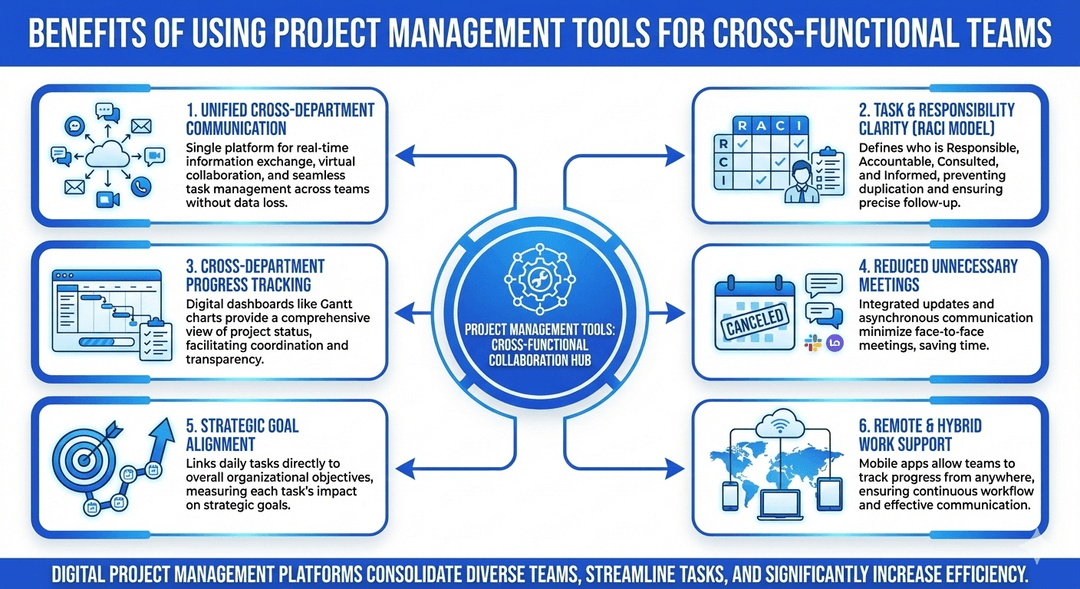
Digital project management platforms consolidate diverse teams, streamline tasks, and increase efficiency. Key benefits include:
- Unified cross-department communication: A single platform ensures real-time information exchange without data loss, supporting virtual collaboration and task management.
- Task and responsibility clarity (RACI model): Defines who is Responsible, Accountable, Consulted, and Informed for each task, preventing duplication and ensuring precise follow-up.
- Cross-department progress tracking: Digital dashboards like Gantt charts provide a comprehensive view of project status and facilitate coordination.
- Reduced unnecessary meetings: Integrated updates and comments minimize face-to-face meetings, while asynchronous communication tools like Slack or Loom support remote work.
- Strategic goal alignment: Linking daily tasks to organizational objectives helps measure each task’s impact on overall projects.
- Remote and hybrid work support: Mobile apps allow teams to track progress from anywhere, ensuring continuous workflow and communication.
Key Features Required in Project Management Tools for Cross-Functional Teams
Effective tools should offer user-friendly interfaces, customizable workflows, seamless integration with enterprise systems, ready-to-use templates, detailed task management, collaboration tools, and visual dashboards.
- Intuitive interface: Simple, responsive design encourages adoption by all team members.
- Customizable workflows and Kanban boards: Flexible workflows per project/department with visual task tracking.
- Enterprise system integration: Connect with CRM, ERP, email, and communication tools (Slack, APIs) for smooth data flow.
- Shared project templates: Ready-to-use templates standardize practices and speed up project initiation.
- Task and dependency management: Subtasks and dependencies ensure proper sequencing across departments.
- Collaboration features (comments, mentions): Real-time interaction, transparency, and accountability.
- Visual dashboards (Gantt, Kanban): Track project timelines and task flow visually, with drag-and-drop adjustments for better planning.
Real-Life Scenarios for Using Project Management Tools Within Cross-Functional Teams
Specialized project management tools can be applied in several real-life scenarios, such as: launching a new product in collaboration between development and marketing teams, managing a joint marketing campaign between content and sales teams, and implementing IT system upgrade projects involving cybersecurity, development, and management teams.
These tools ensure clarity of responsibilities, link tasks to strategic objectives, track progress across departments, and accelerate decision-making processes.
Cross-functional teams face significant challenges when managing projects that include software development, marketing, sales, and cybersecurity, such as conflicting priorities and a lack of transparency between departments.
Using advanced project management tools like Master Team’s integrated digital solutions, task tracking can be unified and linked to strategic objectives, with a centralized dashboard providing real-time progress, customizable reports for performance analysis, and a notification system to alert teams of updates enhancing coordination and efficiency across teams.
Below are key practical scenarios illustrating how cross-functional teams benefit from project management tools:
- New Product Launch (Development + Marketing) – Enhance Collaboration and Achieve a Perfect Launch
When development and marketing teams collaborate on a new product launch, there is a need to coordinate tasks between technical releases and marketing strategies/campaigns.
Using the Master Team platform, project objectives can be linked to execution initiatives and performance tracked in real time, ensuring that technical releases align with the launch schedule. This reduces gaps between teams, increases execution speed, and improves visibility and follow-up.
- Managing a Marketing Campaign (Content Team + Sales) – Organize Tasks and Achieve Clear Results
In a marketing campaign, the content and sales teams work seamlessly through the project management platform. Clear tasks are created for each stage (content preparation, product review, launch, response tracking) and assigned to responsible roles.
This system enables continuous progress tracking, with unified updates on the platform instead of chaotic messages and calls. Responsibilities are clearly distributed using the RACI model, enhancing transparency and preventing role conflicts.
- IT System Upgrade Project (Cybersecurity + Development + Management) – Ensure Execution Accuracy and Task Flow
In complex technical projects like IT system upgrades, precise coordination between cybersecurity, development, and management teams is essential. Gantt charts and performance reports in project management tools allow synchronization of security tasks with development tasks and quality testing, ensuring smooth task sequencing and preventing conflicts.
Implementing Smart Governance within the integrated system transforms cross-department work into an organized sequence of stages, enhancing both speed and accuracy in decision-making.
Best Practices for Managing Cross-Functional Teams Using Project Management Tools
Best practices for managing cross-functional teams with project management tools include setting clear objectives, standardizing workflows, minimizing ad-hoc communication, regularly tracking tasks, and leveraging automation to improve efficiency and accelerate execution.
To achieve optimal results with cross-functional teams, the following practices should be followed:
- Set Clear and Agreed-Upon Goals: Link daily team tasks to shared strategic objectives to ensure each member has a clear understanding of their responsibilities.
- Use a Centralized Dashboard: Monitor project progress and key performance indicators (KPIs) in real time across all departments.
- Establish a Standardized Workflow: Adopt uniform steps for planning and execution while allowing flexibility to adjust details according to each department’s role.
- Minimize Ad-Hoc Communication: Utilize the system for daily communication and centrally document all discussions and updates.
- Regular Task Updates: Log task status regularly to ensure the dashboard reflects the actual state of work.
- Leverage Automation: Link actions and automatically alert the team to accelerate processes and prevent manual errors.
Common Mistakes to Avoid When Managing Cross-Functional Teams
Common mistakes in managing cross-functional teams can hinder progress and negatively impact coordination across departments. These include relying solely on verbal communication, failing to define responsibilities, using multiple tools unnecessarily, and neglecting proper team training on digital tools.
To avoid these pitfalls and ensure effective management of cross-functional teams, attention should be given to the following points:
- Relying Only on Verbal Communication: A critical mistake is not documenting tasks and information on the platform. Direct communication without recording details leads to lost information and fluctuating priorities.
- Lack of Clear Responsibilities: As previously mentioned, the absence of clearly defined roles and responsibilities can result in duplicated work and delayed deliverables.
- Using Multiple Tools Unnecessarily: Using too many programs (e.g., one for communication, another for task management, and a third for time tracking) can cause distractions and workflow friction. According to recent research by Pipeline App, excessive applications lead to "digital friction," wasting time and reducing efficiency.
- Neglecting Team Training on the Tool: Without proper training, the tool becomes just another unused application. Experts warn that the learning curve is often the biggest barrier to adopting a new platform effectively.
Conclusion: The Future of Project Management Starts Today – Master Team is Part of the Solution
Amid the growing challenges of executing projects in Saudi Arabia’s ambitious business environment, adopting specialized project management systems has become essential to move cross-functional teams from coordination chaos to digital discipline. The future of project management begins now, with solutions like those offered by Master Team, combining AI, intelligent analytics, and RPA-powered tools to enhance organizational efficiency and achieve strategic objectives.
Master Team Saudi Arabia empowers institutions to meet their goals precisely and swiftly, aligned with Saudi Vision 2030. Through platforms like P+ PMO Digital Solution and S+ Strategy Digital Solution, organizations integrate smart governance and full transparency, ensuring each team understands its role and works cohesively toward collective success. Explore Diwan Executive Office Solution to complete your digital transformation journey today.
Frequently Asked Questions (FAQ)
1- Why is integration between project management tools and other enterprise systems important?
Integration between digital Project Management Tools and enterprise systems like CRM and ERP ensures smooth information flow and prevents data silos.
2- Can project management tools improve productivity across cross-functional teams?
Yes. Advanced project management tools provide centralized Dashboards, Gantt charts, and RACI frameworks for clearly assigning roles and responsibilities.
3- What role does automation play in improving cross-functional team performance?
Automation helps minimize manual tasks and routine operations, such as sending automatic notifications or updating task statuses. This increases execution speed, reduces human errors, and allows teams to focus on high-value activities, while ensuring workflows remain aligned with project objectives and the organization’s vision.
4- How do project management tools help track progress across different departments?
These tools provide real-time Dashboards, timelines, and KPI indicators, offering a comprehensive view of progress for each department (development, marketing, sales, etc.). Team leaders can detect delays early, take corrective actions, and ensure strategic goals are met while effectively coordinating efforts across multiple teams.