
📉 Imagine managing a large-scale strategic project, with substantial budgets, expert teams, and a fully implemented ERP system... Yet delays continue, cost overruns recur, and risks emerge too late.
Reports arrive late, data is inconsistent across departments, and decisions are made based on estimates, not real-time, accurate figures.
This scenario is not an exception, but a common reality for many organizations that have implemented ERP systems but have failed to optimize project management post-integration.
⚙️ In the age of digital transformation, the problem is no longer about owning an ERP system or project management tools, but about how to operate and leverage them effectively.
When a project management system operates in isolation from the financial, human resources, and supply chain systems, data becomes fragmented, and management loses the ability to make accurate, real-time decisions (Real-Time Decision Making).
📊 Today, the most digitally mature organizations don't settle for technical integration alone; they rely on fully integrated digital ecosystems that directly link:
🔹 Strategic planning and aligning initiatives with goals
🔹 Project, program, and portfolio management (PPM / PMO)
🔹 Resources, budgets, and cost control (Financial & Cost Control)
🔹 Executive governance, real-time reporting, and leadership decision support (Executive Governance & BI)
💡 Here, the integration of ERP with project management systems evolves from a mere technical implementation to a true strategic leverو A lever that turns operational data into immediate insights, projects into measurable assets, and management from a reactive stance to proactive leadership driven by analysis and artificial intelligence.
🔍 In this article, we explore the best practices for managing projects post-ERP integration, and how organizations can maximize the benefits of this integration by:
- Improving governance and transparency
- Controlling timelines and costs
- Enhancing team collaboration
- Utilizing advanced analytics and business intelligence (BI)
- Enabling real-time risk management and decision-making
Best Practices for Project Management Post-ERP Integration
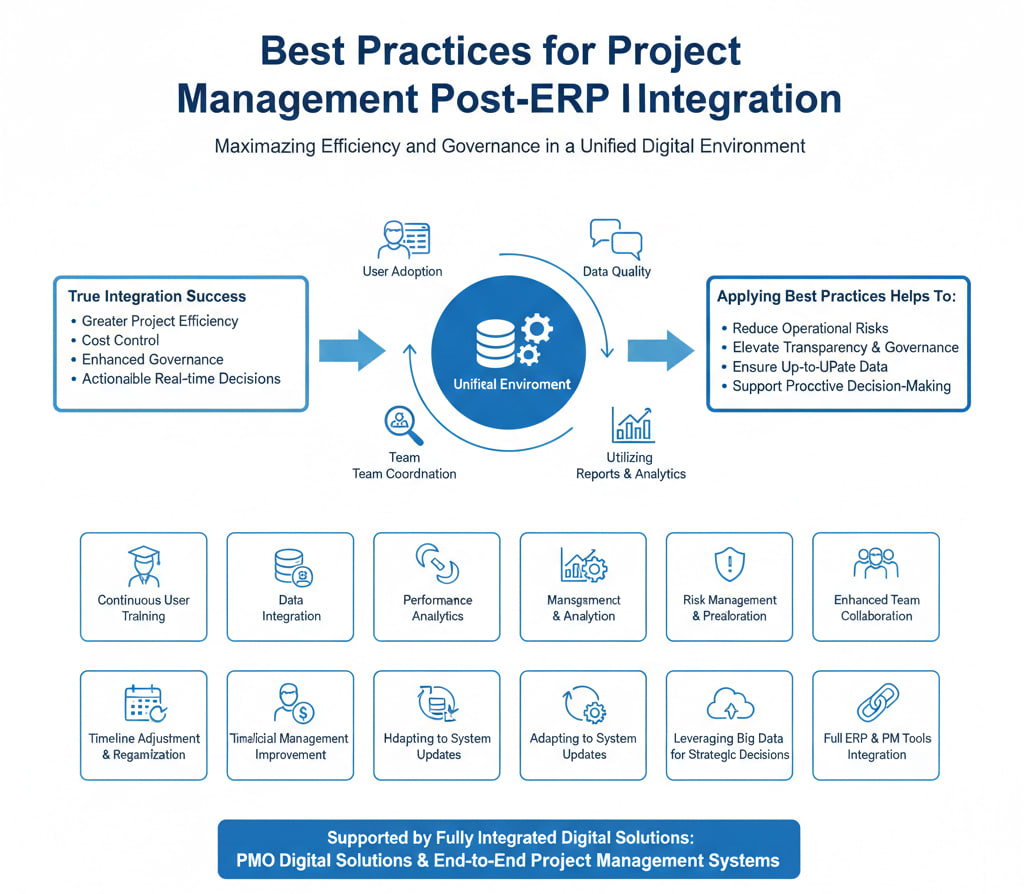
To fully capitalize on the integration of ERP systems with project management tools, a set of best practices must be implemented to ensure continuous performance, data accuracy, and smooth decision-making, not merely technical integration. True integration success is measured by the organization’s ability to manage projects with greater efficiency, control costs, enhance governance, and convert data into actionable real-time decisions.
Once ERP integration is complete, the organization enters a more sensitive phase, where project management takes place in a unified digital environment. During this phase, challenges arise related to user adoption, data quality, team coordination, and the effective utilization of reports and analytics.
Applying best practices post-integration helps to:
- Reduce operational risks
- Elevate transparency and governance
- Improve control over timelines and costs
- Ensure all stakeholders are working with the same up-to-date data
- Support proactive decision-making instead of reactive responses
As a result, the most digitally mature organizations rely on clear frameworks for project management post-ERP integration, supported by fully integrated digital solutions such as PMO Digital Solutions and End-to-End Project Management Systems.
Here are the key best practices for managing projects post-ERP integration:
- Continuous user training post-ERP integration
- Ensuring data integration between different systems
- Monitoring and analyzing performance using ERP reporting tools
- Risk management and predicting issues before they occur
- Enhancing team collaboration using ERP
- Adjusting and reorganizing timelines after integration
- Improving human resources and financial management post-integration
- Adapting to continuous system updates and changes
- Leveraging big data for strategic decision-making
- Achieving full integration between ERP and project management tools
1. Ensuring Continuous User Training Post-ERP Integration – Why is Ongoing Training Crucial After Integration?
Continuous training for users on the ERP system post-integration with project management tools is vital because it ensures effective system adoption and reduces execution errors.
Once the unified system is deployed, employees need to familiarize themselves with ongoing changes and new versions. Regular training increases information retention and builds confidence in using the platform. In an ERP integration project, some users might miss key details about new interfaces, leading to incorrect data entry or underutilization of tools.
Studies indicate that continuous training on the ERP system – such as short courses and hands-on workshops – enhances system usage effectiveness and reduces accounting and operational errors. Moreover, providing ongoing support and guidance accelerates adaptation to technological changes, ensuring projects are delivered with higher efficiency and quality.
2. Ensuring Data Integration Between Different Systems – How Does Data Integration Contribute to Improved Project Management?
Data integration between ERP systems and project management tools ensures the availability of accurate, unified information across all departments, preventing redundancy and errors while facilitating project progress tracking.
When operating independent systems, employees often enter the same data into multiple applications, which wastes time and increases errors. However, with complete integration, the central system communicates directly with all other tools. For example, when a new shipment is updated, the data is automatically reflected in the project schedule, and inventory levels in ERP are adjusted without human intervention.
This connection ensures data consistency across the central system at all times, where all units share the same information synchronously. The result is reliable reports and accurate analytics that empower project managers to make swift, data-driven decisions, such as reallocating resources in response to cost changes or delayed material deliveries.
3. Monitoring and Analyzing Performance Using ERP Reporting Tools – How Do ERP Reports Contribute to Performance Improvement?
ERP reports enable teams to track project progress instantly and accurately, helping to detect delays or cost overruns early on, allowing for immediate corrective actions.
ERP systems provide dashboards and customized reports that display key performance indicators (KPIs) such as task completion rates, budget status, and actual resource usage.
For instance, if the delivery of a phase is delayed, the system generates a real-time alert for project managers, allowing them to reschedule tasks or allocate additional resources before the issue worsens.
Additionally, real-time reports track expenses against estimates, so any budget overruns are highlighted instantly. Overall, this real-time, actionable data transforms reports from mere summaries into strategic tools that enable teams to continuously improve performance and make faster, more accurate decisions.
4. Risk Management and Predicting Issues Before They Happen – How Can Enhanced Risk Management Improve Project Outcomes?
Risk management techniques within ERP systems help forecast potential problems and take preventive measures, saving time and costs, while ensuring project completion without unpleasant surprises.
Advanced ERP integration enables the use of predictive analytics based on historical data to monitor future risk indicators. For example, the system may identify the likelihood of a failure in critical equipment before it actually occurs, allowing the team to perform proactive maintenance and avoid production stoppages or timeline slippages.
Additionally, AI tools in modern systems can analyze spending trends or material supplies to detect anomalies, alerting project managers early. As a result, risk mitigation actions and proactive decision-making lead to improved planning accuracy, reduced delays, and minimized additional costs, ensuring the project progresses confidently and safely towards its goals.
5. Enhancing Collaboration Between Teams Using ERP – How Does ERP Contribute to Team Collaboration?
ERP eliminates silos between departments by consolidating information and tasks into a single platform, ensuring that every team works from the same up-to-date data and coordinates their efforts seamlessly.
The ERP system connects financial, engineering, and administrative units within a unified database, ensuring that every employee has access to the same information in real time. This makes it easy and quick for all parties to retrieve project data related to budgets, resource allocations, and job assignments.
Shared dashboards and real-time alerts streamline workflow coordination between teams. For instance, when the design team completes a task, the system automatically notifies the logistics team to begin the procurement phase, reducing the need for frequent meetings and preventing delays caused by miscommunication.
In doing so, ERP enhances transparency and accountability, clearly defining roles and responsibilities, making each team feel part of the bigger picture and fostering better harmony and collaboration with other teams.
6. Adjusting and Reorganizing Project Schedules Post-ERP Integration – How to Improve Project Timelines After ERP Integration?
ERP allows for dynamic adjustments to project schedules based on actual data, with the system alerting users to delays or resource changes, enabling timely reorganization of the plan.
By consolidating data from various sources (purchasing, production, staffing, etc.), project managers can anticipate bottlenecks before they occur. For instance, if ERP indicates that a delay in the production line will impact shipment deliveries, it allows for the modification of the timeline or the pre-assignment of additional teams.
ERP systems provide advanced scheduling tools, such as automatic Gantt charts, which update in real-time as tasks are completed or delays arise. If task execution slows down, the system sends an alert to the project manager, prompting them to reallocate resources or reschedule the remaining tasks. Ultimately, this flexibility helps keep projects on track within their set timelines, reducing unexpected delays and proactively mitigating the need for replanning.
7. Improving Human and Financial Resource Management Post-ERP Integration – How Can ERP Enhance Human and Financial Resource Management?
ERP systems integrate human resources and financial operations into a single platform, unifying personnel data and budgets while automating processes, leading to more precise workforce allocation and expense management.
For human resources, ERP connects recruitment, leave, attendance, and performance data in one centralized system. Automation within the system processes payroll linked with employee attendance and stores job records, reducing human errors and saving time for the HR department. ERP analytics also help monitor employee performance, identify training needs, and support talent acquisition strategies, improving overall productivity.
On the financial side, ERP ensures unified financial data and accounting procedures across all departments. It integrates billing, expense tracking, and budget management into one system. Instead of dealing with separate software, the finance department can pull live reports and monitor actual expenses against planned ones in real-time.
This integration reduces accounting errors and speeds up account reconciliations. For example, when procurement or customer revenue data is updated, it automatically reflects in the financial records, maintaining data consistency and enhancing auditing and compliance capabilities.
Thus, ERP integration enables balanced allocation of human resources and budgets, while synchronizing HR and financial reports, supporting the strategic planning of resources across the organization.
8. Adapting to Ongoing Changes and Updates in the System – Why Is Adapting to Continuous ERP Updates Vital?
Modern ERP systems are constantly evolving, which means organizations must adopt a culture of continuous learning and effective change management strategies to ensure they keep benefiting from system improvements and avoid efficiency decline.
In today’s business environment, most ERP systems are cloud-based and receive periodic updates. As these systems evolve, new features and interfaces are regularly introduced. If an organization sticks to traditional training methods, sudden introduction of new functionalities can confuse users and lower productivity.
Therefore, experts recommend creating internal adaptation teams to stay on top of updates and simplify them for staff. In other words, reactive training approaches should be replaced with microlearning plans and regular onboarding courses.
The importance of adapting lies in the fact that failing to keep up with changes leads to underutilization of the system. On the contrary, when organizations establish "change ambassadors" in each department and conduct periodic reviews, knowledge spreads quickly, and the workplace becomes filled with ideas for improvement.
With the right organizational procedures, continuous updates result in improved system performance. Users become familiar with new features, leading to higher adoption rates and better overall results.
9. Analyzing Big Data for Strategic Decision-Making – How Can ERP Tools Help You Make Strategic Decisions Using Data?
ERP systems collect vast amounts of operational data, and advanced analytics can be leveraged to extract strategic insights that guide future planning for the organization.
ERP systems capture detailed data across all departments – sales, inventory, production, finance, and more. The integrated analytics tools within the system turn this raw data into actionable information.
Through data mining, teams can identify patterns and trends to measure key performance indicators (KPIs) and assess the impact of decisions. For instance, analyzing sales data from the past year might reveal a seasonal dip in sales of a particular product.
This insight allows the marketing team to adjust their strategies ahead of the season to maximize profits. Similarly, forecasting reports can predict an uptick in demand for the next quarter based on current trends.
Ultimately, ERP transforms data into a strategic tool. If a supply chain manager notices recurring delays from a supplier during bad weather conditions, they may decide to diversify suppliers with local options to mitigate setbacks.
Big Data analytics embedded in the ERP system supports sound decision-making that aligns with long-term goals, whether in inventory management, workforce planning, or investing in new product lines.
10. Achieving Full Integration Between ERP and Project Management Tools – How Does Full Integration Improve Workflow?
Full integration links all stages of a project within one system, unifying every aspect of the project (costs, schedule, resources), which makes the workflow smoother and reduces repetitive manual tasks.
When ERP systems communicate with project management tools, project managers gain a unified view of all project data. Instead of relying on separate spreadsheets, planned budgets, resources, and tasks can be directly imported into the ERP system.
For instance, the integration provides a clear view of actual costs versus the budget, and it automatically updates the progress of tasks linked to each project phase.
Moreover, integration eliminates the need for data entry in multiple systems. When a purchase order or invoice is recorded in the connected procurement tool, the ERP system immediately reflects it in the project accounts without manual intervention.
This not only speeds up the execution of processes but also increases data accuracy and reduces inconsistencies. The final result is a seamless working environment where information flows effortlessly between planning, execution, and reporting, boosting productivity and ensuring higher adherence to timelines and budgets.
Comparison between Using ERP in Projects Before and After Integration
The key difference between project management using ERP before and after integration lies in the source of truth, decision-making speed, and control level.
While projects before integration rely on fragmented data and disconnected tools, leading to delayed and estimated decisions, integration afterward provides a unified digital system that allows management to make real-time, data-driven decisions based on reliable and integrated information.
Before ERP Integration: Most organizations, including large projects, were managed through a mix of spreadsheets (Excel), email, and unconnected tools. This environment led to:
- Data conflict between teams.
- Delays in updating information.
- Difficulty tracking actual vs. planned costs.
- Weak governance and lack of a comprehensive project overview.
After ERP Integration: After integrating ERP with Project Management Systems, the system transitions to an advanced operational model relying on a single central platform (Single Source of Truth). In this model:
- Data flows automatically between finance, resources, procurement, and schedules.
- KPIs are updated in real-time.
- Cost or schedule deviations are detected as they occur.
- Project managers can intervene proactively instead of reacting late.
This transformation not only improves execution but also enhances governance, transparency, and executive decision support, aligning directly with the requirements of digital transformation and Saudi Arabia's Vision 2030, especially in government and large-scale projects.
Comparison Table Before and After ERP Integration:
What Comes After ERP Integration: From Operational System to a Sustainable Competitive Advantage
The integration of Enterprise Resource Planning (ERP) systems with Project Management Tools is not just a technical achievement; it marks the beginning of a new phase in organizational maturity that requires conscious and methodical management post-implementation.
The true value of integration becomes apparent when projects are managed using best practices, starting with continuous user training, ensuring accurate data flow between systems, and utilizing analytical reports and dashboards to make real-time, data-driven decisions.
When these practices are implemented seamlessly, project management shifts from a reactive operational model to a proactive one, driven by governance, transparency, and complete control over costs, time, and risks. This enables organizations to adapt more effectively to changes, provides operational flexibility, and ensures that projects are executed within defined timeframes and budgets, aligning with the requirements of digital transformation and Saudi Arabia’s Vision 2030.
In this context, ERP integration becomes a strategic pillar, allowing executive leadership to see the full picture of projects, turn data into decisions, and transform initiatives into measurable results. This makes the real difference between traditional project management and professional project management based on the world’s best practices.
If your organization has already implemented or plans to integrate ERP, the most important next step is to manage projects the right way post-integration.
🔹 With Master Team, you get an integrated digital ecosystem, including:
- P+ PMO Digital Solution for managing projects, programs, and portfolios (PPM/P3)
- Diwan – Executive Hub for managing executive offices, meetings, and committees
- Analytical dashboards, digital governance, and seamless integration with ERP systems
- Solutions aligned with Qiyas and supporting Saudi Vision 2030 targets
📞 Book a consultation today and discover how Master Team solutions can transform your ERP integration from just an operational system into a strategic lever for performance, governance, and decision-making.
Frequently Asked Questions (FAQ):
1- How can employees be trained on ERP systems after integration?
Training is carried out through periodic interactive microlearning programs and practical workshops. Experts recommend providing continuous follow-up courses to cover new updates, as repeated training has been proven to enhance user understanding and reduce operational errors. Additionally, "change ambassadors" can be assigned within teams to offer ongoing support and guidance.
2- What is the importance of data integration between different systems in project management?
Data integration ensures that each team works with a single, up-to-date source of information, preventing duplicate data entry and reducing errors. When data from sales, production, and finance flows into a central source, tracking project progress becomes more accurate, and financial calculations become more reliable. This cohesive foundation makes decision-making easier and speeds up task execution.
3- How can ERP reports be used to track project progress?
Based on real-time system data, ERP reports display dashboards highlighting key performance indicators (KPIs) such as budget, task progress, and resource utilization. This allows managers to spot deviations such as delays or cost overruns immediately. They can then take corrective actions (like controlling spending or rescheduling tasks) before the problem escalates, ensuring the project stays on track.
4- What are the best ways to manage project risks using ERP?
The best approaches include using predictive analytics and automatic alert features in the system. Advanced ERP tools analyze historical data to detect early signs of risk, such as delays from suppliers or fluctuations in expenses. When a risk indicator is detected, the system provides an immediate alert, allowing the team to take proactive measures like equipment maintenance or budget re-planning to avoid major disruptions.
5- How can collaboration between teams be improved after ERP integration?
Collaboration is improved by unifying the work platform: everyone shares the same data, documents, and real-time updates. When a task is completed, the next team automatically knows what to do, either via alerts or shared reports. Integrated systems also provide shared dashboards and notifications for all stakeholders. In this way, transparency and accountability are enhanced between teams, and everyone works toward unified goals without confusion or task duplication.